
Scribble Maps Blog
Scribble Maps: The Hidden Geo SEO Secret Becomes an AEO Open Secret
The next customer looking for your business may ask an AI a question before they ever open a search result. Where can I find this service? Which locations meet my needs? What is nearby? Which places should I visit, and in what order?
Those questions have geography at their center. They are exactly the kind of questions a useful map can answer.
Scribble Maps has been helping people publish geographic knowledge since 2009. Seventeen years later, that work has a new audience: the search and answer systems helping people navigate the world.
Our hidden Geo SEO secret is becoming an AEO open secret.
The SEO story started long before the AI boom
In February 2010, we announced the Scribble Maps map directory and explicitly described it as search-engine and geo optimized. You can still read the original announcement.
The idea was straightforward: knowledge placed on a map should be discoverable. A useful public map can answer a specific question about real places, whether it describes a business, a destination, or a service area.
Across the www.scribblemaps.com property, the same reporting period recorded 537,314 web search clicks and more than 26 million impressions. Our Search Console overview also showed more than 733,000 indexed pages when reviewed on October 13.
Age alone does not earn visibility. Seventeen years of people creating useful geographic content is the more meaningful story.
AI discovery is already happening
The transition to answer engines is visible in our own data. Google's Search Console beta report for generative AI features recorded 512,491 impressions for the www.scribblemaps.com property from July 12 through October 11, 2026.
There are visits as well as impressions. For September 15 through October 12, 2026, our Google Analytics traffic acquisition report recorded 4,164 sessions in the AI Assistant channel. The largest source was chatgpt.com / ai-assistant, with 3,782 sessions. Sources associated with Gemini, Perplexity, and Claude also appeared.
These are platform-level observations, rather than a prediction of what any individual listing will receive. They show why making geographic knowledge understandable to answer engines matters now.
The crawlers are already here, too
In a one-day Cloudflare analytics review for October 12, 2026, we recorded requests identifying as crawlers and assistants from OpenAI, Anthropic, Perplexity, Meta, Amazon, and ByteDance, alongside Googlebot and Bingbot.
For example, the report counted approximately 38,000 requests identifying as ClaudeBot, 5,300 as OAI-SearchBot, and 1,600 as GPTBot. These figures include unsuccessful requests and redirects; they are request counts, not people or unique pages.
The distinction between crawlers matters. OpenAI distinguishes GPTBot from its search crawler and user-triggered fetches. Anthropic similarly distinguishes ClaudeBot, Claude-SearchBot, and Claude-User. Training-related collection, search indexing, and fetching a page to help answer someone's question serve different purposes.
Our Cloudflare figures use user-agent matching in adaptive analytics. They demonstrate traffic identifying as these services; they do not independently verify every request's identity or prove that a particular page entered a model's training data. The search impressions and referred sessions above are separate evidence of discovery.
From geographic SEO to answer engine optimization
Geo SEO connects content with places. Answer engine optimization, or AEO, makes that content clear enough to help answer a question. Generative engine optimization, often shortened to GEO, is a related term for visibility in generative AI experiences.
For a business, destination, or local publisher, these goals meet in the same place: accurate information about what something is, where it is, and why it matters to the person asking.
A service business can describe its coverage area. An event organizer can explain the location, dates, and ticket information. A tourism organization can publish a trip with named stops in order. A real estate agent can publish a property with its price, rooms and status. A specialist can assemble a useful list of places that is difficult to find elsewhere.
Scribble Maps brings the visual geography and the descriptive information together.
What JSON-LD adds
JSON-LD is a format for structured data. Using the Schema.org vocabulary, it gives software explicit labels for facts that people can read on a page: this is a business, this is its address, these are its coordinates, and this is a question with an answer.
Scribble Maps' structured listing system supports businesses and places, events, lists of places, tourist trips, and properties for sale or rent. Depending on the listing type and information supplied, its JSON-LD can describe addresses, coordinates, contact details, opening hours, service areas, event dates, offers, prices, rooms and floor size, and ordered stops.
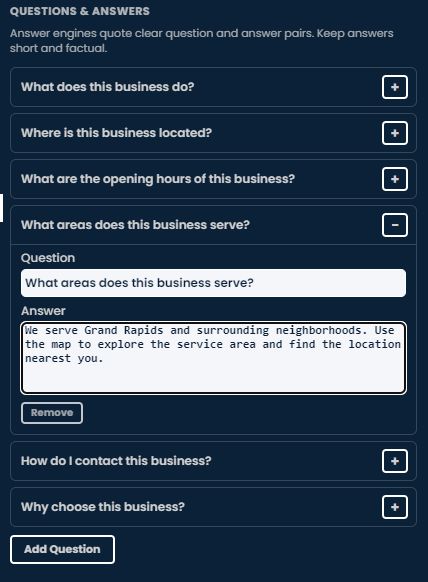
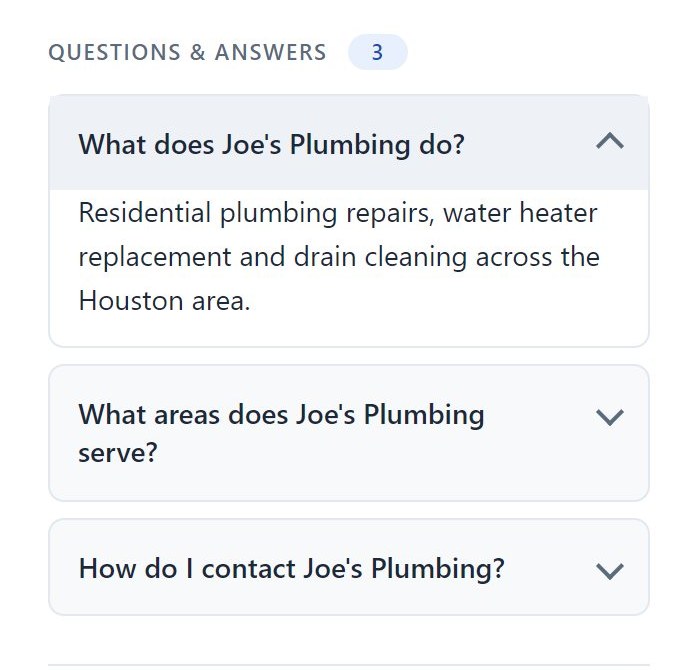
The question-and-answer component adds FAQPage markup with individual Question and Answer entries. Together, those details give the map's subject a more explicit description than an unlabeled point alone.
Google documents structured data as a way to understand page content. It is one part of a useful publishing system: the visible content must carry the same accurate information.
What a listing looks like
A map with a listing gets a new kind of public page. The listing sits in a column beside the map on a desktop and in a sheet under the map on a phone, with the same facts in both. Readers get the answers; search engines and answer engines get the structured data behind them.

- Photos fill the top of the column. Upload several and readers slide through them; the map title sits on the picture.
- The listing type, for example Business · Plumber or Event · Festival, so a reader knows what the page is about at a glance.
- A promo with an end date. It comes down by itself when the date passes, so a stale offer never lingers.
- Location and contact details: name, address, phone (tap to call), website, opening hours and service area, with one-tap links to Google Maps, Apple Maps and MapQuest for directions.
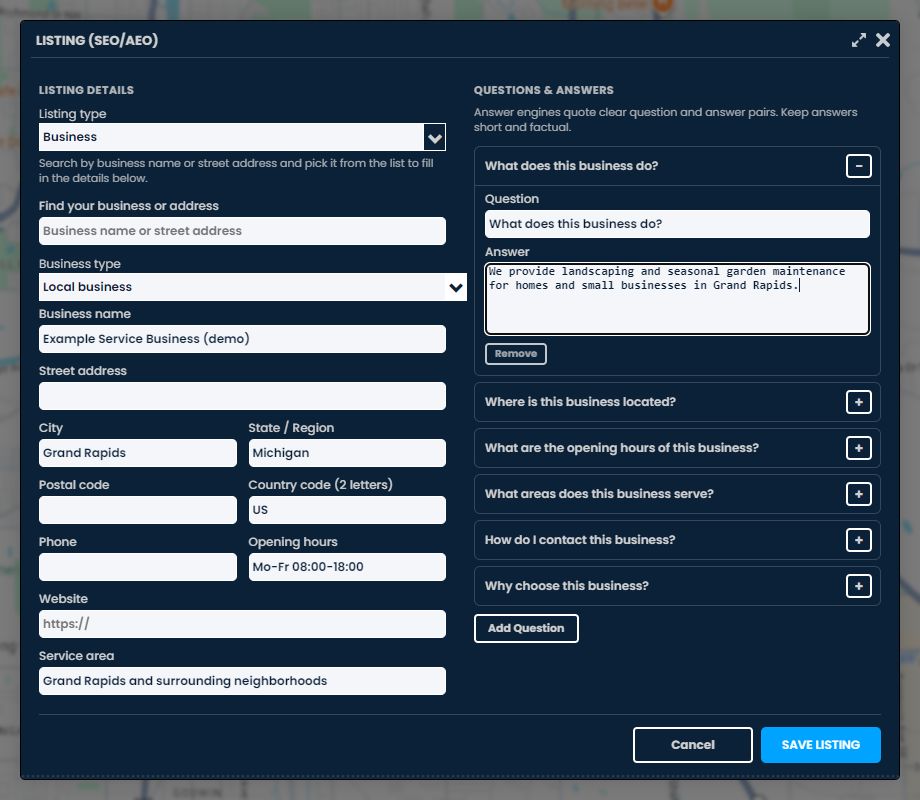
- Questions and answers as cards a reader can open. The same pairs are published as FAQPage structured data.
- Download GeoJSON: the places behind the listing as open data, so crawlers and answer engines can read the geography as well as the text.

Six kinds of listing
Choose the type that matches what the map is about. Each one is published as the matching Schema.org type:
- Business: a business at an address, with type, name, address, phone, website, opening hours and service area. Published as LocalBusiness or the closest subtype, such as Plumber or Restaurant.
- Event: something happening at a place, with the venue, start and end, ticket price and link, and organizer. Published as Event or a subtype such as MusicEvent or Festival.
- Place or landmark: a park, landmark, venue or natural feature that is not a business. Published as the matching Place subtype, such as TouristAttraction or Park.
- List of places: the markers on your map as an ordered list. Published as ItemList, each marker a Place with its coordinates.
- Trip or tour: the markers on your map as an itinerary, with who the trip is for. Published as TouristTrip.
- Property for sale or rent: a house, apartment, room or lot with its price or rent, bedrooms, bathrooms, floor size, year built, status and listing agent. Published as RealEstateListing about the property (House, Apartment and so on) with an Offer that says whether it is for sale or for rent and whether it is still available.
Lists and trips take their places from the markers on the map. Add the markers first, then click Use the markers on this map in the panel, and save the listing again whenever the markers change.
How to add a listing
- In the editor, open Save and choose Public. Click the SEO/AEO tag that appears beside Public. You can also open Share Settings and click Edit business listing (SEO/AEO).
- Fill in the details, or ask Scribble, the assistant in the editor, to fill the listing for you. It opens the panel filled in for you to review before you save.
- Edit the prefilled questions, remove the ones you do not want, or add your own, up to 10. Keep each answer to one or two factual sentences.
- Click Save listing. Every listing is reviewed automatically before it is published. Anything that cannot go out as written is named in the panel with a short note, so you can fix it and save again.
Saving a listing needs a paid Pro Business account; a trial does not count. A Pro Business account can publish up to 5 SEO maps per day. If the plan ends, those maps are unlisted within about an hour and listed again automatically when it returns. The SEO best practices for maps article has the full rules.
The answer-engine system starts with your knowledge
The most useful answers are often the details you already give customers every day. Which neighborhoods do you serve? Where is the entrance? Is the venue accessible? What makes a location relevant to this list? When is the event happening?
Start with a clear map title and a description that explains its purpose. Choose the appropriate listing type, add accurate details, and write concise answers to the questions your audience actually asks. Keep dates, hours, links, and geographic information current.
Clear place names, accurate locations, and useful descriptions make a map easier to understand, for visitors and for the systems helping them find answers.
That is the practical value of an answer-engine publishing system: turning your knowledge of a place into information people can use and software can interpret.
SEO/AEO listings are subject to Scribble Maps' Pro Business eligibility and content rules. Publishing, indexing, rankings, rich results, and AI inclusion are different steps; no listing can guarantee all of them. Google also makes clear that its AI search features require no special AI schema.
The opportunity is already visible: useful maps are being found in search, appearing in AI experiences, and receiving visits from AI assistants.
If your knowledge has a location, give it a map, a clear description, and answers worth finding. Start building with Scribble Maps.
Want a walkthrough for your business or team? Book a 15-minute demo, or see Pro Business pricing.
Measurement note: Search Console figures refer to the https://www.scribblemaps.com/ URL-prefix property. Google Analytics figures refer to the Scribble Maps GA4 property and its reported channel/source attribution. Cloudflare figures cover the scribblemaps.com zone for October 12, 2026 UTC and use adaptive analytics with user-agent matching. Metrics were reviewed on October 13, 2026; the reporting windows and measurements differ.