
Scribble Maps Blog
How to Plan a Ham Radio Rove with a Maidenhead Grid Square Map
A grid locator tells another amateur radio operator roughly where you are. Planning a rove takes another step: deciding where you can stop, which grid each stop belongs to, and how the stops connect.
A Maidenhead grid square map puts those decisions in one view. Use it to shortlist operating locations before you leave, then verify the exact position on site when a grid boundary matters.
Read the locator before choosing the stop
The ARRL introduction to grid squares explains the basic unit: two letters followed by two numbers, such as FN31. It covers 2 degrees of longitude by 1 degree of latitude. The name says “square”, but the boundaries follow latitude and longitude, so the ground width changes with latitude.
Longer locators describe smaller areas within that square. Here is how the parts fit together:
- FN: the field, covering 20 degrees of longitude by 10 degrees of latitude.
- FN31: one of the field’s 100 grid squares.
- FN31pr: a subsquare, covering 5 minutes of longitude by 2.5 minutes of latitude.
AMSAT’s grid-square explanation and coordinate tool provides another way to connect a locator with latitude and longitude. Use the level of detail your operating activity requires rather than assuming that every exchange needs the longest possible locator.
Look at the boundary and the places around it
In Scribble Maps, open Settings from the gear icon at the bottom-left of the map footer. Under Map Settings, choose Maidenhead from the Grid list.
Zooming reveals fields, squares, subsquares and extended squares. Each cell is labelled at the most detailed level that fits. If the lines disappear against the background, change the Line color setting below the grid list.
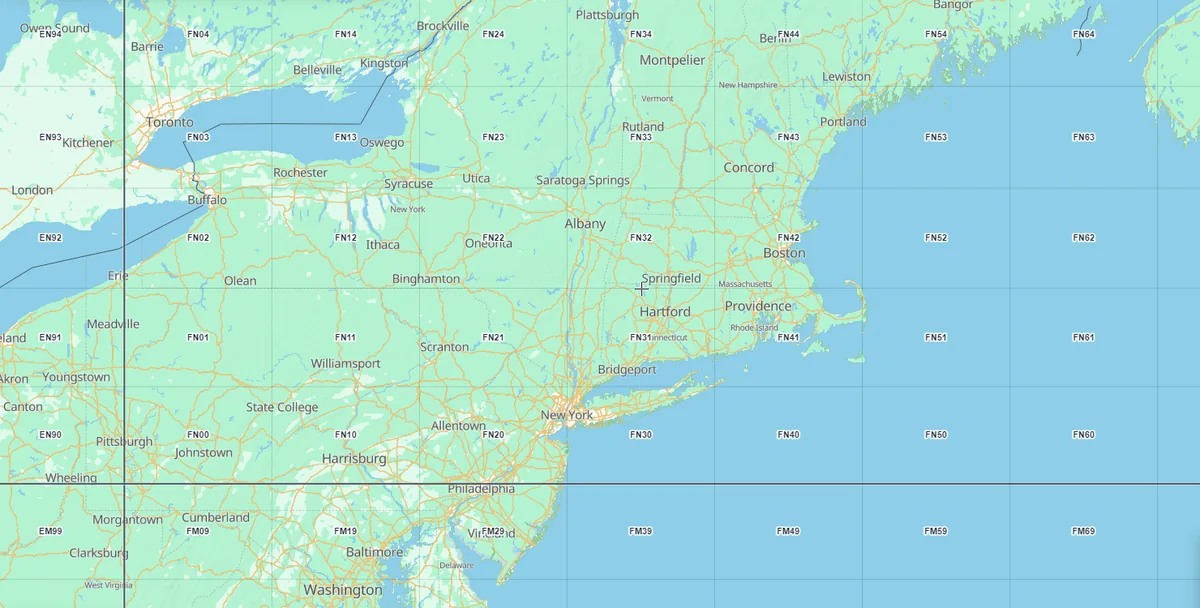
Start with the area you could realistically visit. A boundary is useful context, but it does not tell you whether there is a suitable place to park, permission to operate, or enough room for your setup. Those belong in the planning decision too.
For the complete settings and access details, read Add a map grid overlay (map reference, square, H3, GARS, Maidenhead, range rings).
Turn candidate locations into a workable rove
Consider an illustrative plan with two possible stops in one grid and a third across the boundary. These are planning options, not a documented customer trip. The point is to compare the places you could operate from, rather than simply collecting grid names.
- Mark the candidates. Add a marker for each possible operating spot. Put the expected grid and any access questions in its title or description. The marker is a planning note until you have checked the location.
- Check the connection. Plot driving directions between candidate stops. Compare the route with your available time, and allow for setup and packing rather than treating every minute as operating time.
- Keep a backup. Identify an alternative before relying on a single location. A promising point on the map can turn out to be inaccessible when you arrive.
Scribble Maps supports titled markers with descriptions and driving-direction lines between locations. For the routing steps, see Draw directions between two points.
The useful result is a small set of decisions: a preferred stop, an alternative, the expected grid for each, and a route connecting them. That is more actionable than a map covered in possible destinations.
Verify a boundary claim on the ground
Operating near a grid line is different from qualifying for credit from more than one grid. The ARRL VHF/UHF Century Club uses confirmed Maidenhead grid locators, and its boundary rules require more than placing a marker at an intersection.
Under the VUCC rules, a station claiming simultaneous credit from adjoining grids must physically occupy the relevant grids. The rules also specify GPS verification using WGS84 and evidence of the station’s position. Check the applicable award or contest rules before planning around a boundary claim.
Use the web map to prepare the trip. Use the required on-site checks to establish where the station actually operates. A mapped boundary alone is not evidence that a contact qualifies.
Keep the grid with the plan
The grid overlay is saved with your Scribble Maps map, so someone opening that map sees the grid too. Its cells are reference overlays, not drawing objects you can select or export.
Maidenhead is part of Pro. Logged-in users without Pro can try it with trial credits. Turning it on uses a credit, and settings changes can use credits too. Opening a map that already contains the grid does not use a credit.
Open Scribble Maps and plan your operating stops. Start with the area you can reach, turn on Maidenhead, and choose the locations worth checking in person.